Posts

STL Container Types

Image
 

FFMPEG x264 Command Line Options

 See this post:  https://sites.google.com/site/linuxencoding/x264-ffmpeg-mapping

Windows 10: External Drive and Execute Permissions. How To Turn On.

Image
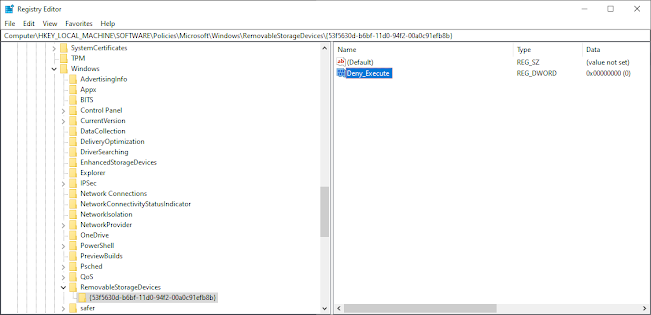
Is your external drive not allowing you to have execute permissions?  Do this: 1- Run regedit.exe 2- Go to  HKEY_LOCAL_MACHINE\SOFTWARE\Policies\Microsoft\Windows\RemovableStorageDevices and set Deny_Execute to 0. 3- Go to:  Computer\HKEY_LOCAL_MACHINE\SYSTEM\ControlSet001\Control\Storage and set Deny_Execute to 0. Now restart your computer and you should be good to go.  If you work on a managed PC, the system may set these back to 1.  You will have to go back and repeat steps 1-3.

VP9 Video Encoding/Decoding Support On A PC

Image
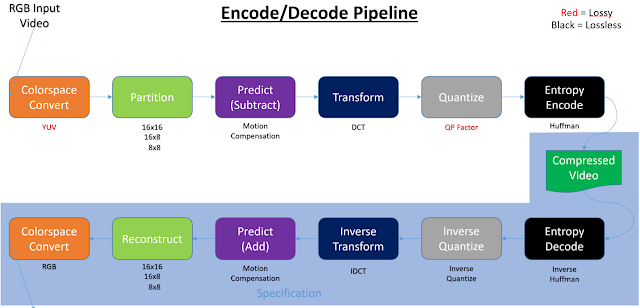
Introduction Video decoding/encoding can take place in the following four types of silicon: 1. General purpose CPU silicon (x86, ARM, SSE, AVX, …) 2. Dedicated CPU silicon (Intel QuickSync, AMD VideoCoreNext) 3. General purpose GPU silicon (cores) (GPGPU, Cuda, OpenCL, Shaders, …) 4. Dedicated GPU silicon (NVidia PureVideo (decode), NVida NVENC (encode)) (Table 1) When video is encoded or decoded any combination of the above silicon can be used. Being this paper is focused on everyday PCs, I’ve left out things like FPGAs, but you could consider an FPGA solution to be more like a general purpose GPU silicon solution. Note, at times this paper uses the term SIP (Semiconductor Intellectual Property core) to denote dedicated encode/decode silicon. Encoding and decoding of video has a defined pipeline: When encoding or decoding video, any one of those colored blocks can be done in hardware or software.   Sometimes a full software approach is ...

Linux: Recursively delete files that match a pattern or filename using 'find'

find . -name "*.bak" -type f -delete But use it with precaution. Run first: find . -name "*.bak" -type f

Emscripten debug flags

em++ -O0 -g4 hello_world.cpp -o hello.html --emrun -s SIMPLIFY_IFS=0 -s ASSERTIONS=2 -s SAFE_HEAP=1 -s STACK_OVERFLOW_CHECK=2 -s DEMANGLE_SUPPORT=1 -s DISABLE_EXCEPTION_CATCHING=0 -s EXPORT_ALL=1 -s EXPORT_BINDINGS=1 -s EXPORT_FUNCTION_TABLES=1 --source-map-base http://localhost:6931/

Classes From XML Schema

This is the CMD to generate the classes from the schema SET XsdPath=C:\Program Files (x86)\Microsoft SDKs\Windows\v8.0A\bin\NETFX 4.0 Tools "%XsdPath%\xsd.exe" YOUR-SCHEMA1.xsd YOUR-SCHEMA1.xsd /classes /namespace:YOUR-NAME-SPACE This is the reference:  https://msdn.microsoft.com/en-us/library/x6c1kb0s(v=vs.110).aspx Another good example:  https://blogs.msdn.microsoft.com/yojoshi/2011/05/14/auto-generating-entity-classes-with-xsd-exe-for-xml-serialization-and-de-serialization/ Then for mapping the class you can use:  https://github.com/AutoMapper/AutoMapper You can install it as a nuget package