FFMPEG has multiple supported deinterlacing filters. Here they are: 10.14 bwdif Deinterlace the input video ("bwdif" stands for "Bob Weaver Deinterlacing Filter"). Motion adaptive deinterlacing based on yadif with the use of w3fdif and cubic interpolation algorithms. It accepts the following parameters: mode The interlacing mode to adopt. It accepts one of the following values: 0, send_frame Output one frame for each frame. 1, send_field Output one frame for each field. The default value is send_field. parity The picture field parity assumed for the input interlaced video. It accepts one of the following values: 0, tff Assume the top field is first. 1, bff Assume the bottom field is first. -1, auto Enable automatic detection of field parity. The default value is auto. If the interlacing is unknown or the decoder does not export this information, top field first will be assumed. deint Specify which frames to deinterlace. Accept ...
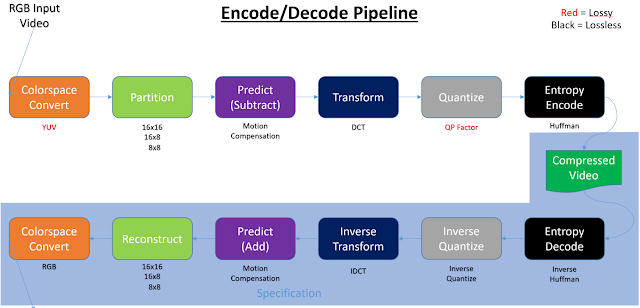
Introduction Video decoding/encoding can take place in the following four types of silicon: 1. General purpose CPU silicon (x86, ARM, SSE, AVX, …) 2. Dedicated CPU silicon (Intel QuickSync, AMD VideoCoreNext) 3. General purpose GPU silicon (cores) (GPGPU, Cuda, OpenCL, Shaders, …) 4. Dedicated GPU silicon (NVidia PureVideo (decode), NVida NVENC (encode)) (Table 1) When video is encoded or decoded any combination of the above silicon can be used. Being this paper is focused on everyday PCs, I’ve left out things like FPGAs, but you could consider an FPGA solution to be more like a general purpose GPU silicon solution. Note, at times this paper uses the term SIP (Semiconductor Intellectual Property core) to denote dedicated encode/decode silicon. Encoding and decoding of video has a defined pipeline: When encoding or decoding video, any one of those colored blocks can be done in hardware or software. Sometimes a full software approach is ...
Its best to just type "ccextractor" and hit return. Yes, its long, but all options are there. If we add or remove options, we update the help accordingly. CCExtractor extracts digital 608 captions by default to an srt file. If you want analog 608 (SCTE20), or digital 708 captions, or SMI output, you must specify flags for each. By default the TN will always use the "-noru" and "-utf8" flags. These flags disable roll up commands, and enable UTF8 encoding, respectively. Make sure you add these two flags to every run of ccextractor. By default ccextractor will always create an output file to receive digital 608 captions. If no digital 608 captions exist, this file will contain no captions. This is the way ccextractor works and there's no way to turn it off. Kind of stupid, but that's how the code was when we got here. It always creates the digital 608 output file at the very start and will fill it with digital 608 ca...
Comments
Post a Comment